 Document studio: PDFs, OCR, redaction, forms & contract reading
Paperwell
Your paperwork in one dossier: PDF tools, OCR, redaction, forms and contract reading.
Paperwell is a document studio that keeps everything about one matter in a dossier: PDFs, scans, office files and pasted texts, every tool run and its result. Merge, split, compress, OCR, redact, fill and sign PDFs; read contracts, privacy policies and forms in plain language; compare offers and versions over time; turn notice periods into calendar reminders and print one consolidated report. Files are processed by the site’s tools and deleted there; the dossier itself stays in your browser.

Screenshots
 Dossier overview: findings across every document
 Contract reading with quoted clauses and questions
 Offer A vs offer B, clause by clause
 Notice deadlines and calendar export
 Page workbench with a live page plan
 Redaction with suggestions and verification
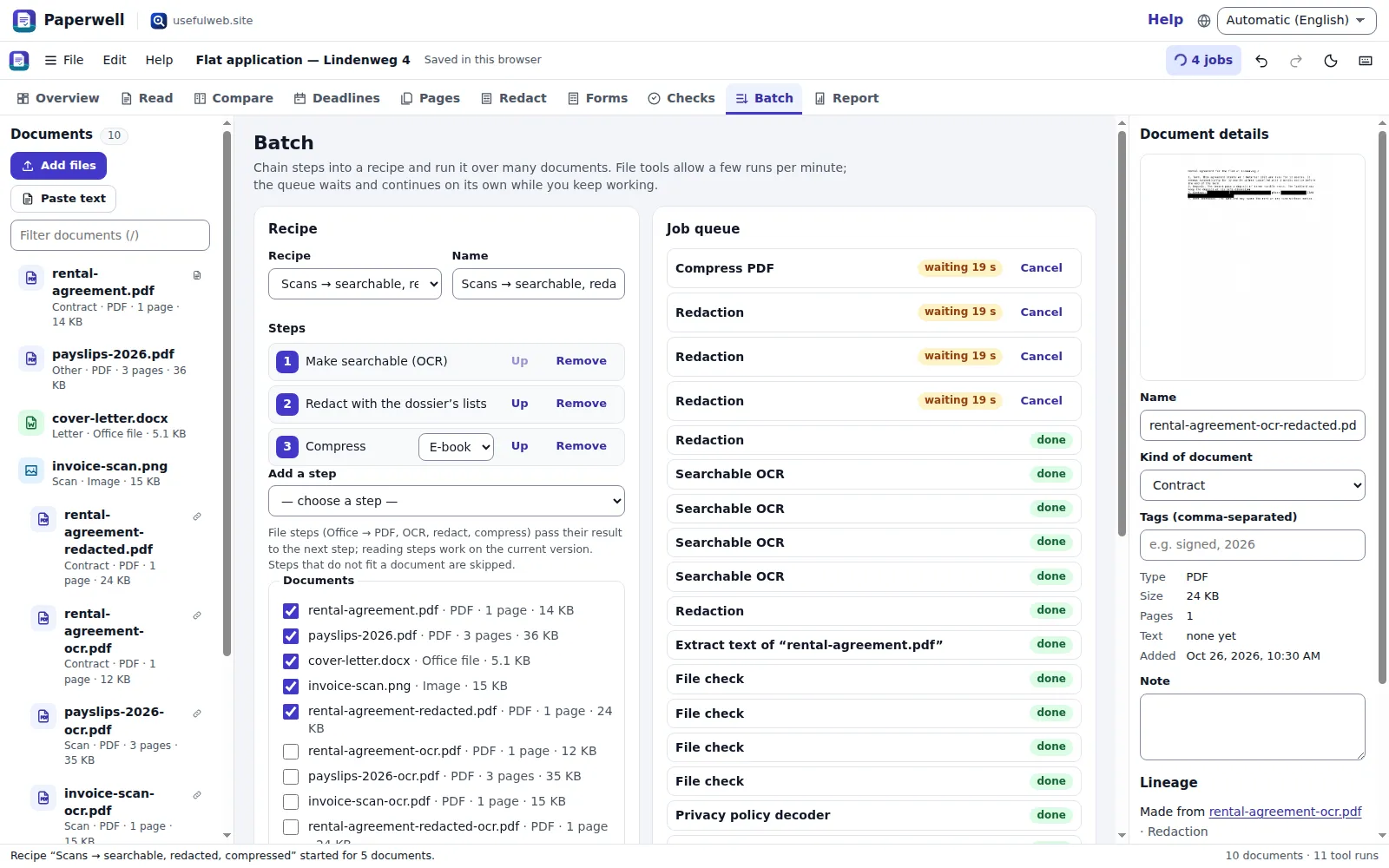 Recipes and batch runs with a rate-limit aware queue
 Consolidated report and exports
 Dark theme: policy changes over time
 Works on phones
Features
One dossier per matter
PDFs, scans, office files, images and pasted texts in one place, with roles, tags, notes and lineage: every tool output becomes a new version linked to its source — nothing is overwritten.
Page workbench
Merge, split, reorder, remove and rotate pages with a live page plan that shows every resulting file before anything is uploaded.
Convert & compress to a size limit
Office files and images to PDF, PDF pages to images, compression presets — and a size budget (e.g. 5 MB for an upload portal) that tells you whether the packet fits.
Searchable OCR and full text
Give scans a text layer in up to eight languages and extract the full text of PDFs, DOCX and photos, so every document can be searched, compared and checked.
Redaction with verification
Personal data found in the text (IBANs, e-mails, phones, card numbers) becomes redaction terms; the redactor’s before/after count proves nothing searchable is left.
Forms & signatures
List the fields of a PDF form, keep your answers as a reusable profile, fill, sign and flatten — and get every field and jargon term of a foreign-language form explained.
Contract reading
Clauses that need attention — lock-in, auto-renewal, notice, price changes, liability, arbitration — with the quoted wording and questions to ask before you sign.
Offers A/B and versions over time
Two offers side by side clause category by clause category; old and new versions of a policy or law with the changed sections, numbers, deadlines and data practices.
Privacy policy scorecards
Data collected, purposes, sharing and sale, rights, retention and transfers of every policy in the dossier — and what changed when the policy was updated.
Deadlines & calendar
Terms, renewals and the last day to give notice from the contract’s own numbers, plus your own due dates — exported as an .ics calendar with reminders.
Recipes & batch runs
Chain steps (office → PDF, OCR, text, redact, compress, contract and policy reading, file check) and run them over many documents in a queue that respects the tools’ rate limits and retries on its own.
File, accessibility & spec checks
Find out what a file really is without uploading it, fix the accessibility of HTML letters, turn portal screenshots into step-by-step instructions and check charger, PC or version specs.
Identifiers & citations
DOIs, ISBNs, ISSNs, ORCIDs, arXiv ids and PMIDs found in your texts with check-digit validation, resolved into formatted citations.
Evidence dossier
Write down claims or findings and back each one with excerpts and page numbers from the dossier’s documents. A PDF citation opens at its page in the browser’s PDF viewer, and the evidence table goes into the report and a CSV export.
Consolidated report & exports
One dashboard of findings over all documents, a printable report (PDF via print), CSV of findings and runs, JSON, Markdown notes with safe preview and an SVG/PNG chart.
Local-first and connected
Autosave and recent dossiers in your browser, project files with or without the documents, share links, Google Drive, App Bridge hand-over to other apps and API/MCP access.


Templates
Start from a ready-made project and change it to fit.
SaaS contract before signing
A two-year software subscription with automatic renewal. Check the clauses, compute the last day to cancel and put it in your calendar.
Two gym memberships compared
Offer A is more expensive per month but flexible; offer B is cheaper with a 24-month lock-in and automatic renewal. Compare the clauses side by side.
Privacy policy update (old vs new)
A note-taking app changed its privacy policy. See what changed between the versions and how the data practices moved.
Foreign-language form explained
A German child-benefit style application. Get every field and jargon term explained in plain language, keep your answers as a reusable profile and note the documents to attach.
Tenancy act amendment
Two versions of a (fictitious) tenancy act. Find the changed sections, notice periods and deposits, and put the effective date in the calendar.
Job application packet (5 MB limit)
Turn a cover letter, CV, references and certificates into one PDF that fits a portal limit of 5 MB: convert, merge in order, compress and check the size.
Reading list with identifiers
Notes with DOIs, ISBNs, an ORCID and an arXiv id. Find every identifier, check the check digits and format citations.
Built-in tools
Paperwell uses these tools. Each one also has its own page and works on its own, in the browser, through the JSON API and through MCP.
- Paperwell Contract Notice Deadlines Paperwell engineLast day to cancel a contract: terms, renewals and notice deadlines, with a calendar file.
- Paperwell PDF Page Planner Paperwell enginePlan a PDF merge, split, reorder, removal or rotation and see every resulting page first.
- Paperwell Document Text & Data Scan Paperwell engineFull text of a PDF, DOCX or scan plus identifiers, personal data, dates and amounts in it.
- Office to PDF ConverterConvert Word, Excel, PowerPoint, OpenDocument, RTF and CSV files to PDF with LibreOffice.
- PDF ↔ Image ConverterTurn PDF pages into PNG or JPG images, or combine images into a PDF without quality loss.
- PDF CompressorMake PDFs smaller with Ghostscript presets or custom image DPI and JPEG quality, with previews.
- PDF Form & Signature StudioList and fill PDF form fields, and place a visible signature image or typed name on a page.
- PDF Merge, Split & ReorderMerge PDFs, split by page count or ranges, and reorder, remove, rotate or duplicate pages.
- Searchable PDF OCRMake scanned PDFs searchable and copyable with OCRmyPDF and Tesseract, optionally as PDF/A.
- Secure PDF RedactorBlack out names, numbers or areas in a PDF for real: the text is removed, not just covered.
- Form TranslatorPlain-language help for confusing forms: field-by-field hints and jargon explained.
- Privacy Policy DecoderWhat a privacy policy says it collects, shares, sells and keeps — with quoted evidence.
- Before You SignSpot risky contract clauses (renewal, notice, liability, non-compete…) before you sign.
- What Changed in This Law?Compare two versions of a law or regulation section by section, with changed numbers and deadlines.
- The Compatibility EngineWill this charger, cable, version or PC part work together? Rule-based checks with margins.
- Accessibility FixerTurn WCAG 2.2 problems in your HTML into concrete code fixes, grouped by effort.
- Screenshot to StepsTurn a screenshot of an app or website into numbered steps for what you want to do.
- File Format DoctorFind out what a file really is from its bytes, why it will not open and how to convert it.
- CiteShapePaste a DOI, ORCID iD, ISBN or arXiv ID: validated, resolved, and formatted as APA, BibTeX and RIS.
- Safe Markdown PreviewRender Markdown with GFM tables and footnotes to sanitised HTML and see what was removed.
For AI agents
Paperwell runs on a deterministic engine. The same functions are available as tools with a JSON API and MCP, so scripts and AI agents get exactly the results the app shows.
- Paperwell Contract Notice Deadlines – Last day to cancel a contract: terms, renewals and notice deadlines, with a calendar file.
Tool page ·POST https://paperwell.usefulweb.app/api/v1/tools/paperwell-notice-deadlines/calculate· MCPpaperwell_notice_deadlines - Paperwell PDF Page Planner – Plan a PDF merge, split, reorder, removal or rotation and see every resulting page first.
Tool page ·POST https://paperwell.usefulweb.app/api/v1/tools/paperwell-page-plan/calculate· MCPpaperwell_page_plan - Paperwell Document Text & Data Scan – Full text of a PDF, DOCX or scan plus identifiers, personal data, dates and amounts in it.
Tool page ·POST https://paperwell.usefulweb.app/api/v1/tools/paperwell-document-scan/calculate· MCPpaperwell_document_scan - Office to PDF Converter – Convert Word, Excel, PowerPoint, OpenDocument, RTF and CSV files to PDF with LibreOffice.
Tool page ·POST https://paperwell.usefulweb.app/api/v1/tools/office-to-pdf-converter/calculate· MCPoffice_to_pdf_converter - PDF ↔ Image Converter – Turn PDF pages into PNG or JPG images, or combine images into a PDF without quality loss.
Tool page ·POST https://paperwell.usefulweb.app/api/v1/tools/pdf-image-converter/calculate· MCPpdf_image_converter - PDF Compressor – Make PDFs smaller with Ghostscript presets or custom image DPI and JPEG quality, with previews.
Tool page ·POST https://paperwell.usefulweb.app/api/v1/tools/pdf-compressor/calculate· MCPpdf_compressor - PDF Form & Signature Studio – List and fill PDF form fields, and place a visible signature image or typed name on a page.
Tool page ·POST https://paperwell.usefulweb.app/api/v1/tools/pdf-form-signature-studio/calculate· MCPpdf_form_signature_studio - PDF Merge, Split & Reorder – Merge PDFs, split by page count or ranges, and reorder, remove, rotate or duplicate pages.
Tool page ·POST https://paperwell.usefulweb.app/api/v1/tools/pdf-merge-split-reorder/calculate· MCPpdf_merge_split_reorder - Searchable PDF OCR – Make scanned PDFs searchable and copyable with OCRmyPDF and Tesseract, optionally as PDF/A.
Tool page ·POST https://paperwell.usefulweb.app/api/v1/tools/searchable-pdf-ocr/calculate· MCPsearchable_pdf_ocr - Secure PDF Redactor – Black out names, numbers or areas in a PDF for real: the text is removed, not just covered.
Tool page ·POST https://paperwell.usefulweb.app/api/v1/tools/secure-pdf-redactor/calculate· MCPsecure_pdf_redactor - Form Translator – Plain-language help for confusing forms: field-by-field hints and jargon explained.
Tool page ·POST https://paperwell.usefulweb.app/api/v1/tools/form-translator/calculate· MCPform_translator - Privacy Policy Decoder – What a privacy policy says it collects, shares, sells and keeps — with quoted evidence.
Tool page ·POST https://paperwell.usefulweb.app/api/v1/tools/privacy-policy-decoder/calculate· MCPprivacy_policy_decoder - Before You Sign – Spot risky contract clauses (renewal, notice, liability, non-compete…) before you sign.
Tool page ·POST https://paperwell.usefulweb.app/api/v1/tools/before-you-sign/calculate· MCPbefore_you_sign - What Changed in This Law? – Compare two versions of a law or regulation section by section, with changed numbers and deadlines.
Tool page ·POST https://paperwell.usefulweb.app/api/v1/tools/what-changed-in-this-law/calculate· MCPwhat_changed_in_this_law - The Compatibility Engine – Will this charger, cable, version or PC part work together? Rule-based checks with margins.
Tool page ·POST https://paperwell.usefulweb.app/api/v1/tools/compatibility-engine/calculate· MCPcompatibility_engine - Accessibility Fixer – Turn WCAG 2.2 problems in your HTML into concrete code fixes, grouped by effort.
Tool page ·POST https://paperwell.usefulweb.app/api/v1/tools/accessibility-fixer/calculate· MCPaccessibility_fixer - Screenshot to Steps – Turn a screenshot of an app or website into numbered steps for what you want to do.
Tool page ·POST https://paperwell.usefulweb.app/api/v1/tools/screenshot-to-steps/calculate· MCPscreenshot_to_steps - File Format Doctor – Find out what a file really is from its bytes, why it will not open and how to convert it.
Tool page ·POST https://paperwell.usefulweb.app/api/v1/tools/file-format-doctor/calculate· MCPfile_format_doctor - CiteShape – Paste a DOI, ORCID iD, ISBN or arXiv ID: validated, resolved, and formatted as APA, BibTeX and RIS.
Tool page ·POST https://paperwell.usefulweb.app/api/v1/tools/citeshape/calculate· MCPciteshape - Safe Markdown Preview – Render Markdown with GFM tables and footnotes to sanitised HTML and see what was removed.
Tool page ·POST https://paperwell.usefulweb.app/api/v1/tools/safe-markdown-preview/calculate· MCPsafe_markdown_preview
- MCP endpoint (Streamable HTTP):
https://paperwell.usefulweb.app/mcp - Project file format (JSON Schema): https://paperwell.usefulweb.app/project.schema.json
- OpenAPI description: /openapi.json · llms.txt · API & MCP
Build a project through the API, then open it in the app with a link to https://paperwell.usefulweb.app/app#project=<base64url JSON>.
Import & export
Import
- Images (PNG, JPG, TIFF, GIF, WebP)
- Office documents (DOCX, DOC, ODT, RTF, XLSX, PPTX, CSV …)
- Text, Markdown and HTML
- Paperwell project (.paperwell.json, with or without embedded files)
- Project link (#project=…)
Export
- Every tool output (PDF, images, ZIP)
- Paperwell project (.paperwell.json) and bundle with files
- Printable report (PDF via print)
- Findings and runs (CSV)
- Deadlines (.ics calendar)
- Notes and report (Markdown)
- Findings chart (SVG/PNG)
- Document text (TXT)
Keyboard shortcuts
| Keys | Action |
|---|---|
| Ctrl + O | Open project file |
| Ctrl + S | Save project file |
| Ctrl + Shift + S | Save project with documents (bundle) |
| Ctrl + Z / Ctrl + Y | Undo / redo |
| Ctrl + Enter | Run the main action of the current view |
| Ctrl + P | Print report / PDF |
| A | Add documents |
| 1 … 9, 0 | Switch view (overview, read, compare, deadlines, pages, redact, forms, checks, batch, report) |
| J / K | Next / previous document |
| / | Filter the document library |
| Delete | Remove the selected document (library focused) |
| ? | Keyboard shortcuts |
Frequently asked questions
Is Paperwell free, and do I need an account?
Yes, it is free and needs no account. The dossier is saved in your browser (IndexedDB); you can also download it as a file or save it to Google Drive when you are signed in.
Are my documents uploaded?
Only when you run a tool on them: the file is sent to the usefulweb.site tool, processed and deleted; results can be downloaded for about two hours and Paperwell copies them into your browser right away. Local features — the page plan, text scan, deadlines, comparisons, the file check by its first bytes and the report — run entirely in your browser.
Is the contract reading legal advice?
No. The before-you-sign, privacy-policy-decoder and what-changed tools are rule-based text analyses that quote the wording they found. They can miss or misread clauses; for decisions with legal or financial consequences ask a qualified professional.
How does the redaction verification work?
The secure-pdf-redactor removes the text under every match, flattens the pages and searches the finished PDF again. Paperwell shows the before/after counts per term and marks the document as verified only when nothing searchable is left. Scanned pages need OCR first, otherwise their text cannot be found.
Why do batch runs sometimes wait?
File-processing tools are limited to a few runs per minute per visitor. Paperwell’s queue spaces the jobs out, waits the time the server asks for when the limit is reached and continues on its own; you can keep working meanwhile.
How are the notice deadlines calculated?
From the start date, the initial term, the renewal period and the notice period you confirm (Paperwell suggests them from the contract reading). Notice must arrive by the last day of the term minus the notice period; open-ended contracts can end on any day, at month, quarter or year end. Public holidays are not considered.
Can AI agents use Paperwell?
Yes. All seventeen site tools plus three Paperwell engine tools (paperwell-notice-deadlines, paperwell-page-plan, paperwell-document-scan) are available through the JSON API and MCP on this host, and the dossier format is documented as a JSON schema, so an agent can prepare a dossier and hand it over with an #project= link.
Does it work offline?
Partly. Opening dossiers, reading and editing texts, the page plan, text scan, deadlines, comparisons and exports work offline once the page is loaded. Tool runs need a connection; jobs queued while offline start when you are back online.
How does the evidence dossier work?
On the Overview, add a claim, then add evidence to it: choose a document, optionally a page, and paste or type the excerpt. Paperwell does not extract or check citations — you enter them and should verify them against the source. Open PDF page opens a stored PDF at that page in a new tab (allow pop-ups); if you remove a document, its name and the excerpt stay with the claim.
Limitations
What Paperwell does not do (yet):
- PDF pages are not rendered in the browser: page previews come from the tools (the first page of a result) and page counts are read from the PDF structure, which can fail for unusual files.
- Tool output (summaries, clause labels, warnings) is written by the site tools in English and is translated only where a translation exists.
- The contract, policy, form and law readers are rule-based pattern matchers for English and German texts; they quote what they found but cannot guarantee completeness.
- Text extraction reads the text layer of PDFs; scanned PDFs need OCR first, and OCR quality depends on the scan.
- Uploads per tool run are limited (most PDF tools 100 MB, text readers 5 MB, document scan 10 MB) and file tools allow only a few runs per minute.
- Project files embed documents only when you choose “Save with documents”; share links and Drive saves contain texts and results but not the binary files.
- Deadlines ignore public holidays and the way notice must be delivered; reminders work only in the calendar you import the .ics file into.
- Signatures are images or handwriting-style text stamps, not qualified electronic signatures.
- Evidence excerpts and page numbers are typed by you and not verified; jumping to a PDF page needs a browser PDF viewer that supports page links (#page=) and allowed pop-ups.
Tutorials
Learn Paperwell step by step.
- Your first dossier — read a contract and find the last day to cancelOpen the SaaS contract example, run the contract reading, turn its notice period into a deadline and export it to your calendar.Beginner 6 min
- Compare two offers and two versions of a policyPut two gym contracts side by side clause by clause, then see what changed between the old and new privacy policy of an app.Intermediate 8 min
- Merge PDFs, redact personal data and compress to a size limitCombine two PDFs with a live page plan, black out an IBAN, e-mail and phone number with verified redaction and fit the result under an upload limit.Intermediate 10 min
- Understand a foreign-language form, then fill and sign a PDFGet every field and jargon term of a German form explained, keep your answers as a reusable profile and add a signature stamp to a PDF form.Intermediate 8 min
- Batch recipes, the job queue and file checksChain OCR, redaction and compression into a recipe, run it over many documents without hitting rate limits, and check files, HTML letters and specs.Advanced 9 min
- The report, exports, project files and sharingPrint one consolidated report, export findings and runs as CSV, save the dossier with or without its files, share it as a link and hand documents to other apps.Beginner 6 min
- Build an evidence dossier with page citationsRecord claims on the Overview, back each one with excerpts and page numbers from your documents, jump to the cited PDF page and put the evidence into the report.Intermediate 6 min
Ready to try it?
Other premium apps
-

Kerfwise
Cabinet & furniture CAD
Design cabinets and furniture, get cut lists, optimised sheet layouts, costs and drawings.
-

Kinetica
Robot motion studio
Simulate robot arms in your browser: kinematics, trajectories, collisions, program export.
-

Threadsmith
Embroidery digitizing studio
Draw or import artwork, turn it into stitches, export DST, PES, JEF or EXP files.
-

Ohmforge
Virtual electronics workbench
Draw a circuit, switch it on, and measure it with real-feeling bench instruments.
-

Twinworks
Factory digital twin & production simulation
Model a production line, simulate it and find the bottleneck — free, in your browser.
-

Agentlab
AI-agent & LLM workbench
Test an AI agent before release: permissions, traces, costs, citations and output checks.
-

Bundlekeep
Local project backup
Back up projects from every usefulweb app into one file, check it and restore any part.
-

Chainscope
Web3 investigation desk
Investigate transactions, bridges, contracts, DAOs and wallets in one case file.
-

Chartroom
Data & charts studio
Import data, chart it, run analyses and publish a report — one workspace, free.
-

Fieldday
Sports club & training organiser
Fixtures, brackets, ratings and training plans for your club — in one workspace.
-

Flipline
Drawing, storyboards & animation
A few drawings. A little life. Make a flipbook in your browser.
-

Hearth
Home & travel planner
Plan meals, chores, home care, a move and trips for your whole household in one place.
-

Keysmith
Crypto & secrets lab
Audit certificates, keys, TLS and passwords in one lab; secrets stay on your device.
-

Ledgerly
Household finance & life-admin desk
Budgets, bills, subscriptions, loans, contracts and deadlines on one private desk.
-

Lumina
Photo editor & image toolkit
Bring out what you saw. A free photo studio, right in your browser.
-

OBSCURIQ
OSINT case desk
Organize public-source research: cases, a research log, pivots and indicators.
-

Opsdeck
Developer & ops workbench
One deck for CI failures, cron, traces, k8s events, API diffs, query plans and Terraform.
-

Pageboard
Website inspiration boards
Collect website references, sort them with tags and arrange them on a moodboard.
-

Panelcraft
Comic books & figure references
Shape a page. Arrange a book. Give your story a voice.
-

Proofline
Math notebook
Solve, graph, test and visualise in one notebook — with data, findings and a report.
-

Provenance
Software supply-chain security desk
SBOMs, CVEs, containers and licences in one risk register — free, in your browser.
-

RavingDesk
Paper trading workspace
Practise trading on paper: orders, ledger, risk, exposure and journal. No real money.
-

Reelcraft
Audio, video & image batch studio
Audio, video & image batch studio: cut, convert, compress, subtitle, reframe
-

Renderloom
3D scene & material studio
Shape a scene. Find its light. Keep every idea editable.
-

Signalhouse
Website & internet infrastructure inspector
Inspect DNS, TLS, mail, CDN and routing of all your domains — and see what changed.
-

Tonegrid
Tone matrix & beat sequencer
Light up squares to build looping melodies and beats, then arrange them into songs.